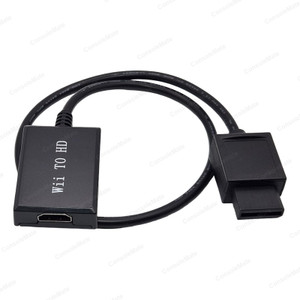
HDMI Converter for N64, SNES and GameCube – No Power Lead Needed
Most new TVs no longer have yellow, red and white AV inputs.
Check compatibility
Picture and sound over one HDMI lead; green power LED; plug and play, one way only (console to TV)
How to connect: plug the converter into the console's AV MULTI OUT port, run an HDMI cable to your TV, switch the console on and select that HDMI input. The green LED shows it is powered. It works one way only, console to TV.
Key product details
- No power lead needed – powered by the console's own AV port, so it's just console, converter and HDMI cable
- Converts the console's analogue AV signal to HDMI for modern TVs without AV inputs (supplier-rated 1080p output)
- Compatible with Nintendo 64, Super Nintendo (SNES, incl. Jr), Super Famicom and GameCube – they share the same AV MULTI OUT port
- PAL and NTSC – Australian and imported consoles
- HDMI output only – no headphone jack
About this item
This converter plugs straight into the AV MULTI OUT port on the back of the console and sends picture and sound to the TV over one HDMI cable.
It takes its power from the console itself, so there is no USB lead or power adapter to plug in.
Compatibility – please check your console: it fits consoles with the Nintendo AV MULTI OUT port – Nintendo 64, Super Nintendo (SNES, including the later Jr model), Super Famicom and Nintendo GameCube (all models, using the analogue AV MULTI OUT port). It does not fit the original NES or Famicom, Wii, Wii U, Switch or the mini Classic editions.
Picture: it converts the console's analogue AV signal and upscales it for HDMI TVs (supplier-rated 1080p output). The picture is as sharp as a good AV connection; it does not add detail that was never in the game. Sound travels over HDMI – there is no headphone jack.
In the pack: 1 × HDMI converter with attached lead.
You will also need: an HDMI cable. HDMI cable not included.